

20G-2X.8C.0.G

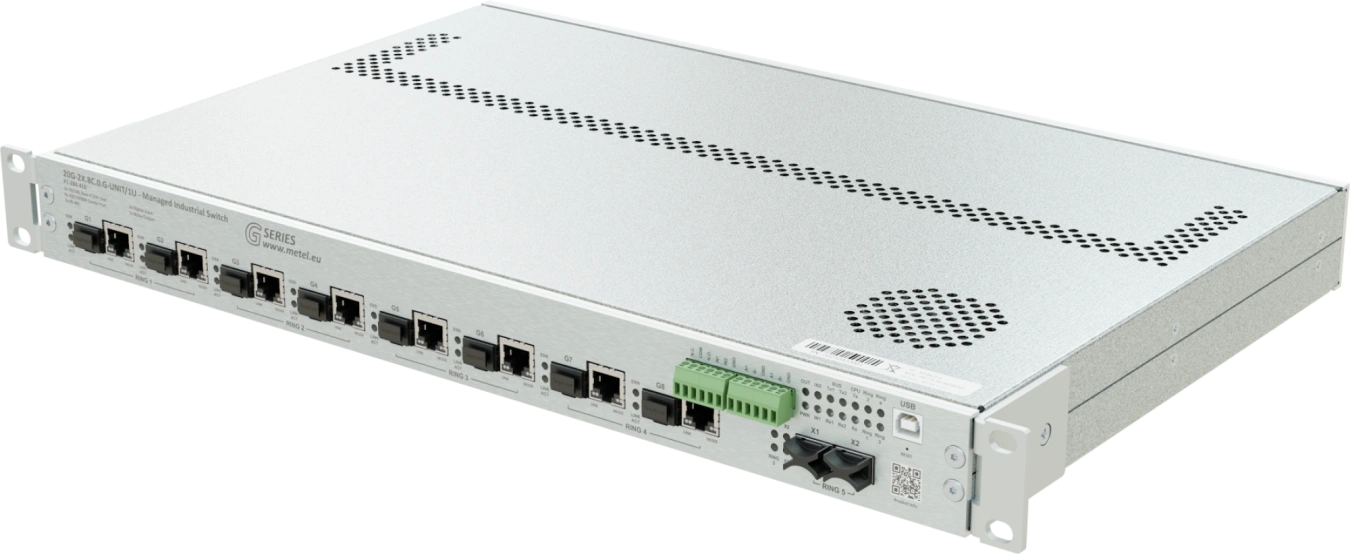
- 2x SFP+ slot 10 GBASE-R / 1000 BASE-X
- 8x COMBO ports (SFP/RJ45)
- 2x RS485 / Modbus-RTU
- 2x digital/alarm input & 1x programmable relay
- Configuration via SSH CLI and GUI SIMULand
- Secure Boot
- Redundant topology LAN-RING, RSTP, MSTP
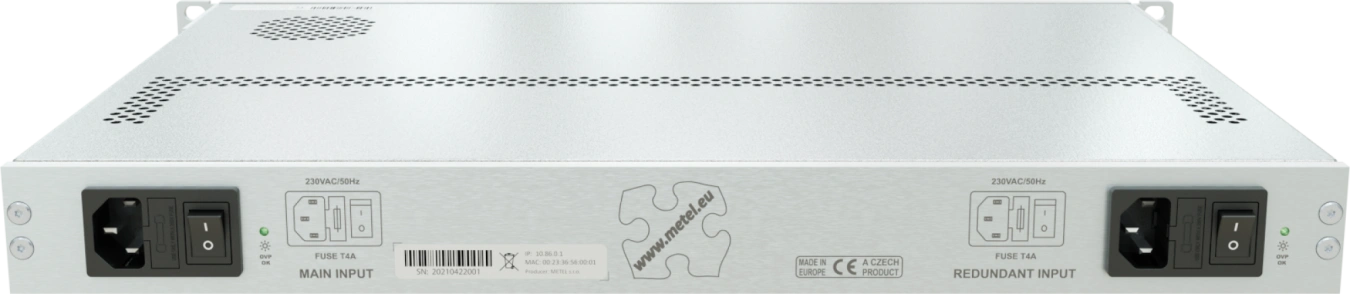
- 2 independent power inputs
- VLAN, QoS, SNMP, SMTP, SNTP, IGMPv1/2, RSTP, LLDP, 802.1X, LACP, MSTP, Tacacs+, Syslog
- 64 events with HTTP/ONVIF client, Email, IP Watchdogs, ETH events, TCP, Modbus, inputs / outputs etc
- Overvoltage protection up to 30A (8/20µs)
- Operating temperature from -20 °C to +50 °C
Industrial managed switches with SSH CLI and SIMULand GUI configuration are equipped with COMBO ports, SFP+, RS485 bus, digital/alarm inputs and programmable relay. In addition to supporting common network standards, they also include event management with 64 automatic events, making these switches ideal for complex applications with high demands on security and flexibility of the devices used. The switches support redundant MESH/RING topologies with sub-30ms link recovery and redundant power supplies. Thanks to the highly rugged hardware, the switches can be deployed in a wide range of operating temperatures from -20 to 50 °C. With speeds up to 10G per port, these switches are suitable for deployment in server rooms.
Some of these features will be released during 2026!
A current list of available features is available upon request at info@metel.eu.
The devices are developed and manufactured in the EU and are NDAA compliant.
Models
20G-2X.8C.0.G-UNIT/1U
Industrial-managed 19"/1U switches with SSH CLI and SIMULand GUI configuration are equipped with: 2x SFP+ slots 10 GBASE-R, 8x COMBO ports (SFP/RJ45), Serial bus 2x RS485 / RS422 / Modbus, 2x digital/alarm input, 1x programmable relay output, 2 independent power inputs, Redundant LAN-RING topology, RSTP, Event management with support: HTTP/ONVIF client, Email, IP Watchdogs, ETH events, TCP, Modbus, DIO, balanced loops... VLAN, QoS, SNMP, SMTP, SNTP, IGMPv1/2, RSTP, LLDP, 802.1X, Surge protection up to 30 A (8/20 µs), Operating temperature from -20 °C to +50 °C
Order code: 1-284-410
Availability: Deploying into production
20G-2X.8C.0.G-UNIT/1U-DC
The industrial managed switches with SSH CLI and SIMULand GUI configuration are equipped with: 2x SFP+ 10 GBASE-R slots, 8x COMBO ports (SFP/RJ45), 2x RS485 / RS422 / Modbus serial bus, 2x digital/alarm input, 1x programmable relay output, 2 independent power inputs, redundant LAN-RING topology, RSTP, event management with support: HTTP/ONVIF client, email, IP Watchdogs, ETH events, TCP, Modbus, DIO, balanced loops... VLAN, QoS, SNMP, SMTP, SNTP, IGMPv1/2, RSTP, LLDP, 802.1X, surge protection up to 30 A (8/20 µs), operating temperature from -20 °C to +50 °C, 1x 230 VAC input, 1x 24-60 VDC input.
Order code: 1-284-400
Availability: Deploying into production
Specifications
Technical parameters
| SLOT SFP+ | |
|---|---|
| Number of | 2 |
| Supported formats | 10 GBASE-R / 1000BASE-X |
| COMBO PORT | |
|---|---|
| Number of | 8 |
| SFP slot | 100/1000 BASE-LX, BASE-BX |
| RJ45 | 10/100/1000 BASE-T |
| RS485 | |
|---|---|
| Number of | 2 |
| Speed | max. 115200 bps |
| Surge protection | 30 A waveform 8/20 μs |
| DI/BI INPUTS | |
|---|---|
| Number of | 2 |
| Digital mode | NC / NO |
| Alarm mode | Analog 0 - 30 kΩ for symmetrical loops |
| RELÉ OUTPUT | |
|---|---|
| Number of | 1 |
| Contact type | Switching |
| Max. Load | 62.5 VA (30 W) / 1 A / 60 V (resistive load) |
| 230 VAC POWER SUPPLY | |
|---|---|
| Number of | 2 / 1 (DC variant) |
| Input voltage range | 180 - 260 VAC |
| Connector | IEC 60320 C13 |
| Energy consumption | Max. 20 W |
| POWER 24 - 30 VDC (DC variant) | |
|---|---|
| Number of | 1 |
| Input voltage range | 24 - 30 VDC |
| Connector | WR-TBL Series 3405 - 5.08 mm |
| ENVIRONMENT | |
|---|---|
| Operating temperature | -20...+50 °C |
| Storage temperature | -40...+70 °C |
| Humidity | Max. 95 % |
| MECHANICS | |
|---|---|
| Weight | 4.2 kg |
| Dimensions - h / w / d | 1U x 483 x 284 mm |
| IP protection | IP 20 |
| Cooling | Passive |
| SECURITY | |
|---|---|
| Firmware Booting | The code is encrypted and signed |
| Secure Boot decrypt and verify the signature | |
| Firmware Upgrade | The FW image is encrypted and signed using AES-256, RSA-4096, SHA-512 |
| SNMP | SNMPv3 - SHA-512 / AES-256 (recommended) |
| SNMPv2c (obsolete) | |
| GUI Application | Digitally signed installation file using SHA-256, RSA 4096 |
| IEEE 802.1X-2004 | RFC3748 - EAP Packet Format, Authenticator PAE, Supplicant PAE |
| SSH | SSH v2, OpenSSH, OpenSSL |
| Tacacs+ | Authentication, Authorisation, Accounting |
| MANAGEMENT | |
|---|---|
| Application | SIMULand.v4 |
| SNMPv3 | Encrypted |
| Encrypted | CLI |
| SWITCH | |
|---|---|
| MAC address | 16 K |
| Max. frame size | 10 K (Jumbo) |
| Packet buffer memory | 2 Mbit |
| Switching | Store-and-forward, full wire-speed, non-blocking on all ports |
| Switching capacity | 56 Gbps |
Standards and protocols, EMC and safety
| EMC and safety | ||
|---|---|---|
| EN 55032 | EMC of multimedia devices - emission requirements | |
| EN 55035 | EMC of multimedia devices - immunity requirements | |
| EN 62368-1 | Safety requirements of Information technology equipment | |
| EN IEC 63000 | The Assessment Of Electrical And Electronic Products With Respect To The ROHS | |
| EN 61000-4-2 | 8 kV | Air discharge |
| EN 61000-4-2 | 6 kV | Contact discharge |
| EN 61000-4-3 | 20 V/m | Radiated RF field |
| EN 61000-4-4 | 2 kV | Bursty |
| EN 61000-4-5 | 2 kV | Shock pulses |
| EN 61000-4-6 | 10 V | Resistance to HF field induced line disturbances |
| EN 61000-4-8 | 30 A/m | Magnetic field |
| EN 61000-4-11 | Short-term power dips and outages | |
| EN 61000-6-2 | Immunity - industrial environment | |
| EN 50121-4 ed.4 | Railway applications - EMC Emission and immunity of signalling and communication equipment | |
| Standards and protocols | |
|---|---|
| IEEE 802.3i | 10BASE-T 10 Mbit/s (1.25 MB/s) over twisted pair IEEE 802.3u for 100BaseT(X) and 100BaseFX |
| IEEE 802.3u | 100BASE-TX, 100BASE-T4, 100BASE-FX Fast Ethernet at 100 Mbit/s (12.5 MB/s) with autonegotiation |
| IEEE 802.3ab | 1000BASE-T Gbit/s ethernet over twisted pair at 1 Gbit/s (125 MB/s) |
| IEEE 802.3z | 1000BASE-X Gbit/s ethernet over optical fiber at 1 Gbit/s (125 MB/s) |
| IEEE 802.3ae | 10 Gbit/s ethernet over fiber |
| IEEE 802.3ac | Max. frame size 1522 bytes (allow 802.1Q tag) |
| IEEE 802.3x | Flow Control |
| IEEE 802.1AB | Link Layer Discovery Protocol (LLDP) |
| IEEE 802.1p | Class of Service |
| IEEE 802.1X | Port-based Network Access Control (PNAC) |
| IEEE 802.1q | VLAN tagging |
| Modbus TCP/RTU | Master / Slave |
| SNMP v2c/v3 | Simple Network Management Protocols |
| IGMP v1/v2 | Internet Group Management Protocols |
| SNTP | Simple Network Time Protocol |
| SMTP | Simple Mail Transfer Protocol |
| RSTP | Rapid Spanning Tree Protocol |
| LAN-RING.v1, v2 | Ring topology with a very short time reconfiguration of max. 30ms |
| Management | GUI SIMULandv4 - USB C / Encrypted management via LAN |
| SSH | Command Line Interface |
| LACP | IEEE 802.3ad, Link Aggregation Control Protocol |
| MSTP (under development) | Multiple Spanning Tree Protocol |
| Tacacs+ | Terminal Access Controller Access-Control System for Authentication, Authorization, and Accounting (AAA) in network security |
| Syslog | Standard for message logging |
| Mirror | Switch port mirroring |
| Remote Access IP Table | List of authorised IP addresses for switch management |
Downloads
STEP models
 20G-2X.8C.0.G
.stp
20G-2X.8C.0.G
.stp
Application notes
 SIM4 without internet
.pdf
LAN-RING switch marking system
.pdf
LACP for G series switches
.pdf
SIM4 without internet
.pdf
LAN-RING switch marking system
.pdf
LACP for G series switches
.pdf
Manuals
Open Source used in LAN-RING G series
.pdf
VLAN Configuration Metel
.pdf
802.1X Configuration
.pdf
Cisco-Metel VLAN Configuration
.pdf
Installation manual
.pdf
CLI manual: 8.2061.16967
.pdf
Manuál CLI: 6.1960.16208
.pdf
Manuál CLI: 5.1921.16090
.pdf
Manuál CLI: 4.1904.15956
.pdf
Manuál CLI: 3.1852.15742
.pdf
Manuál CLI: 2.1814.15599
.pdf
Manuál CLI: 1.1701.15081
.pdf
Drivers and software
 MIB files
.zip
USB drivers
.zip
SIMULand.v4
.msi
FW: 7.2001.16674
.tar
FW: 8.2061.16967
.tar
MIB files
.zip
USB drivers
.zip
SIMULand.v4
.msi
FW: 7.2001.16674
.tar
FW: 8.2061.16967
.tar
Package contents
- Switch
- Power cable
- Installation manual
Accessories


FAQ
What are the default passwords for the G-Series switch?
SNMPv3 (read and write)
Username:"master"
Authentication algorithm: SHA1
Authentication password:"mastermaster"
Private algorithm: AES128
Private password:"mastermaster"
SNMPv3 (read only)
Username:"user"
Authentication algorithm: SHA1
Authentication password:"useruser"
Private algorithm: AES128
Private password:"useruser"
SNMPv2c (read and write)
Community:"write"
SNMPv2c (read only)
Community:"read"
SSH (ethernet)
User:"metel"
Password:"metel"
SSH (USB)
Service:"metel"
User:"metel"
Password:"metel"
Will the IP address, mask and gateway change after a factory reset?
Yes. A USB factory reset will restore the device to factory settings.
Default parameters
IP address - printed on the switch label
Mask - 255.0.0.0
Gateway - 10.1.0.1
Will the configuration of the G-series switch be preserved after the FW upgrade?
YES, the configuration should be preserved even after a system upgrade, but it is always a good idea to backup the current configuration beforehand. I recommend making a complete backup to avoid any problems that may occur during the upgrade.
How is the compatibility of SFP modules from different manufacturers guaranteed ?
The mechanical and electrical parameters of SFP modules and slots are defined in the MSA (multi-source agreement). This ensures mutual compatibility between SFP module manufacturers and SFP slots of network elements. The SFP module includes an EEPROM. It stores information about the module type, supported speed, optical interface type, etc. The most widely used standards in IT are 100BASE-LX and 1000BASE-LX standards (LC connectors) with 2-fiber communication. This has probably also led to the fact that some commercial switches do not support the more modern single-fiber 100BASE-BX and 1000BASE-BX standards. Specifically, this refers to Byte 6 in the EEPROM (Ethernet Compliance Codes). For the above reasons, all BX-1000-...SFP modules have bit 1 (1000BASE-LX) set in Byte 6 and BX-1000-...SFP modules have bit 4 (100BASE-LX) set in Byte 6. The modules are then easily detected even by a switch that does not implement 100/1000BASE-BX support.
What do the W4 and W5 markings on SFP modules mean?
For modules with bidirectionaldata transmission over a singlefiber (wave multiplex), it is necessary to connect the optical modules correctlyto each other. Thismeans that, for example, inMETELWDM modules,the modulemarkedW4can only be interconnected with the modulemarkedW5. It is not possible to connect W4 with W4 or W5 with W5.
BX-100(0)-20-Wx-L
WavelengthsW4: TX:1310 / RX:1550 nm
WavelengthsW5: TX:1550 / RX:1310 nm
BX-10G-20-Wx
WavelengthsW4: TX:1270 / RX:1330 nm
Wavelengths W5: TX:1330 / RX:1270 nm
Does it affect how I insert SFP modules into SFP slots in the switch?
YES, ifyouare using the LAN-RING protocol. In terms of the LAN-RING protocol, the port with thelowerindex is thetransmitportand the port with thehigherindex is thereceiveport.Therefore,the rulemustbefollowedthat the optics will be connected from thelowerindex portto thehigherindex port.Therefore,inallswitchesin a ring,SFP modulesmustbeinserted in thesameway, e.g., an SFP with theW4 tag at the endwill be inserted into slot G1and anSFP with theW5 tag will be inserted into slot G2.
NO, ifyoudisable the LAN-RING protocol oruse the RSTP protocol. Inthiscase,it does not matter how the SFPs are inserted.
What encryption and authentication methods are supported on the switch for SNMPv3?
SNMPv3-enabled switches have SHA1 and AES128 methods enabled by default. You can change to SHA512 and AES256c in the configuration.
What is the maximum recommended load for 20G/2G/200M optical ports?
The recommended line load is 75% of the total data throughput.
Can LAN-RING also be used as a bus system?
Yes, of course, this option is available for the LAN-RING system. Only in this case, we recommend disabling the ringing function in the switch configuration (None) or switching LAN-RING to Rapid Spanning Tree Protocol (RSTP-M).
Extending UTP/FTP to more than 100 m?
If the distance between the camera and the switch is longer than 100 m, we use a LAN-EXT solution. This is a device that can repeat the route of the link, even several times in a row.
Different RSTP protocol behaviour
I have observed different RSTP behavior of your switch compared to a competing switch in the following situation. There are two switches in the network connected to each other by a fiber optic link. Egress filtering is enabled on one of these devices (Egress filtering: No unknown destination address). However, only one switch is available at this time because the link is blocked by the RSTP protocol. However, if I replace the unavailable switch with a competing device with a similar configuration, both switches are available.
Egress filtering causes BPDU frames to be sent only in one direction because the other direction is filtered. This causes the first switch to know about the second, but the second switch does not know about the first. This condition is handled by the so-called "contention mechanism". This was incorporated into the 802.1D-2004 standard and solves the problem you mentioned by blocking the link to prevent loops. Our implementation of the RSTP protocol complies with this standard. Other vendors may have a different implementation of the RSTP protocol based on an older standard that did not include a "dispute mechanism".